One agent per role — with clear boundaries on who sees what, which data, and which tools. Self-hosted, open source, fully audited.
Pinchy is the one place your team works through AI: across your own software and external tools — with the boundaries set once, at the hub.
Each agent is scoped to exactly the data and tools its job needs — default-deny, nothing more.
Reads PDF inquiries, suggests prices from your history, and drafts the quote in Odoo. Never sends without a human's approval.
Answers from your knowledge base and drafts replies in Gmail or Outlook for a person to review and send, with every source cited.
Walks new hires through setup and answers handbook questions — reading only the directories you've approved.
Matches incoming invoices to purchase orders in Odoo and flags mismatches — read-only on the ledger, no payments.
Boundaries aren't a setting you bolt on — they're a property of the hub. Three questions, answered once, enforced on every action.
Role-based access for people; per-agent permissions for agents. Group visibility controls who even sees which agent.
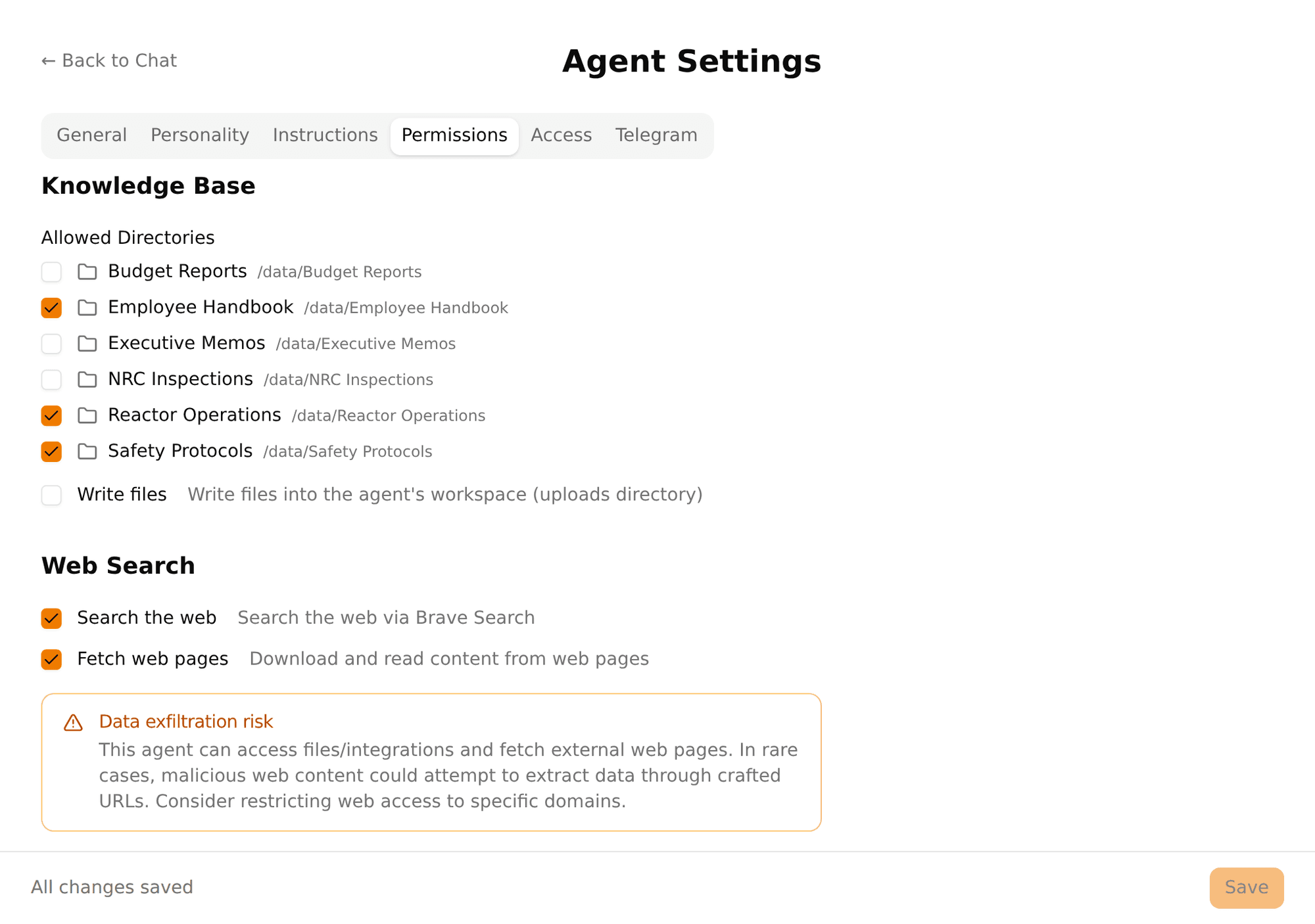
Agents read only the directories you grant — read-only, default-deny. The boundary stays at the agent, not flattened into one pool.
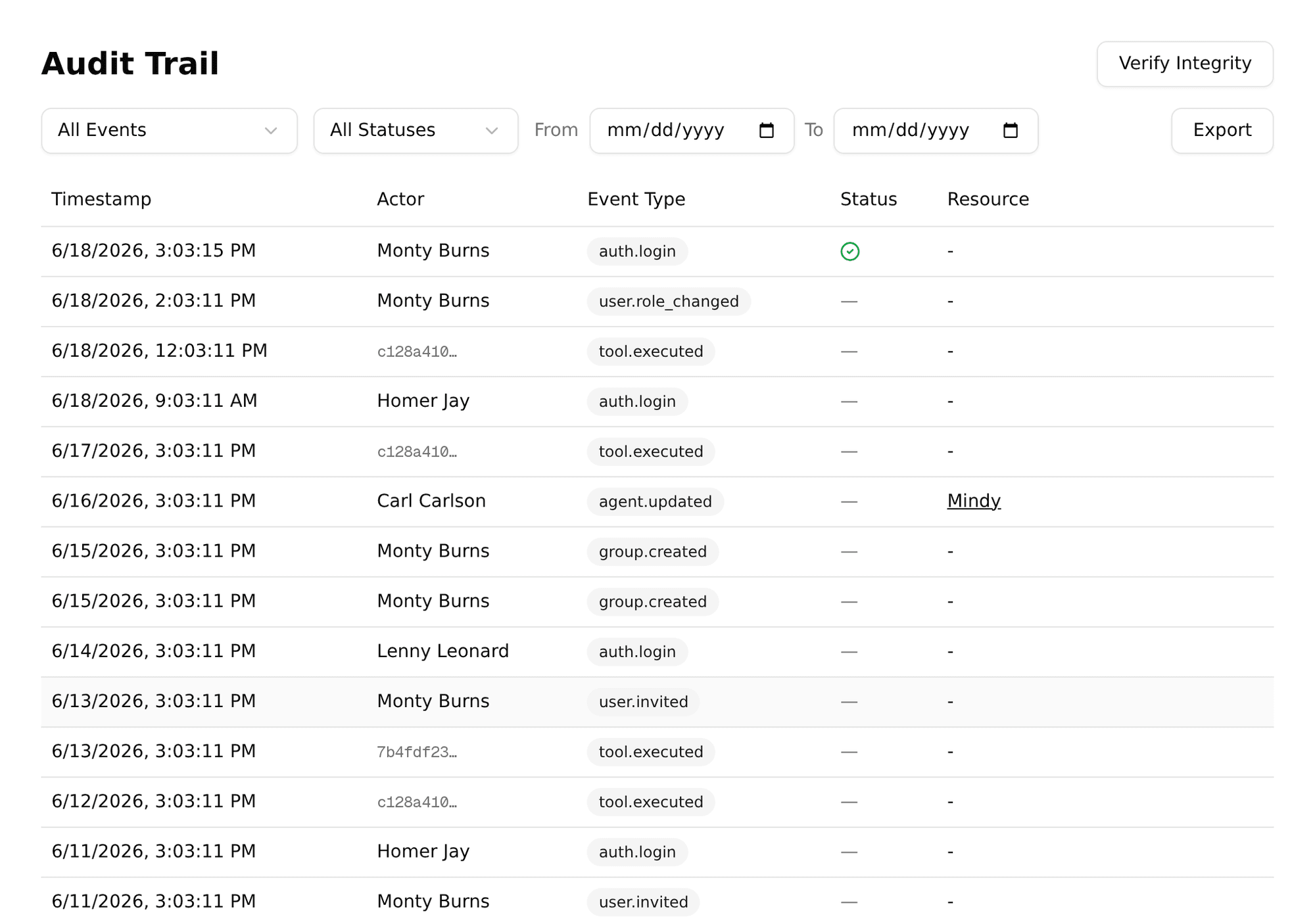
Agents reach systems through scoped plugins, never raw shell. Every call is gated by the allow-list and written to the signed audit trail.
Per-agent allow-list, default-deny. Every tool and directory enabled explicitly.
Per-row HMAC-signed, append-only, exportable to your SIEM. Tamper-evident.
Group-based visibility — control who can even see which agent.
Admin and Member roles, basic RBAC, and invites that map to your org.
Name, character, model and boundaries — configured per agent from one panel.
Let the right agents research the live web — granted per agent, audited, run from your own server.
Give each agent its own knowledge, with every answer citing its source.
Token and cost analytics by source, agent, and user — timezone-correct.
Docker isolation, scoped plugins, signed audit — the architecture behind the guardrails.
One Docker Compose command on any Linux box. Pre-built GHCR images.
16 ready agent templates that read and draft across your ERP — scoped per agent.
Give any agent its own Telegram channel, with the same guardrails as the web UI.
OpenAI, Anthropic, Google, or fully local via Ollama. No vendor lock-in.
No US-cloud dependency, no per-seat SaaS, no data leaving your walls. Pair Pinchy with local models and it runs completely offline.
$ docker compose up -d ✓ pinchy-db started ✓ pinchy-web started ✓ openclaw-runtime started (model: ollama/llama3) → Smithers is ready to help. http://localhost:3000
Start a 30-day trial on your own data — or book a 30-minute call and we'll walk through the use case that fits your team.
Open source & built in public — audit every line on GitHub.
FAQ
Not on its own. OpenClaw gives agents full system access with no built-in permission layer — that's why Pinchy exists. Pinchy adds Docker container isolation, per-agent allow-list permissions, basic RBAC (Admin / Member roles), group-based agent visibility, and per-row HMAC-SHA256 signed audit trails. Granular RBAC (custom roles, SSO/SAML) is on the roadmap.
You control the models, so you control the costs. Docker hosting is free on your own servers. API costs typically run $1 to $150/month per agent depending on model choice and usage volume. Sonnet vs Opus alone is a 10x cost difference.
Yes. Pair Pinchy with a local model via Ollama and nothing ever leaves your network. Zero external connections. For teams that need cloud models, just add your API key — your choice.
You need to be comfortable with Docker Compose — that's it. Run one command, configure via the admin dashboard. Five minutes from zero to running agents.
Yes. Pinchy's core is licensed under AGPL-3.0. Full source code on GitHub. Pinchy's entire codebase is open source. The free Community edition is fully functional for small teams; a paid Pro tier unlocks team-governance features (groups, agent access control, usage analytics) via a license key, not closed code. Inspect it, audit it, deploy it yourself.