Feature
Every agent action, cryptographically signed and permanently recorded.
Your compliance team can trace exactly what happened, when, and who triggered it.
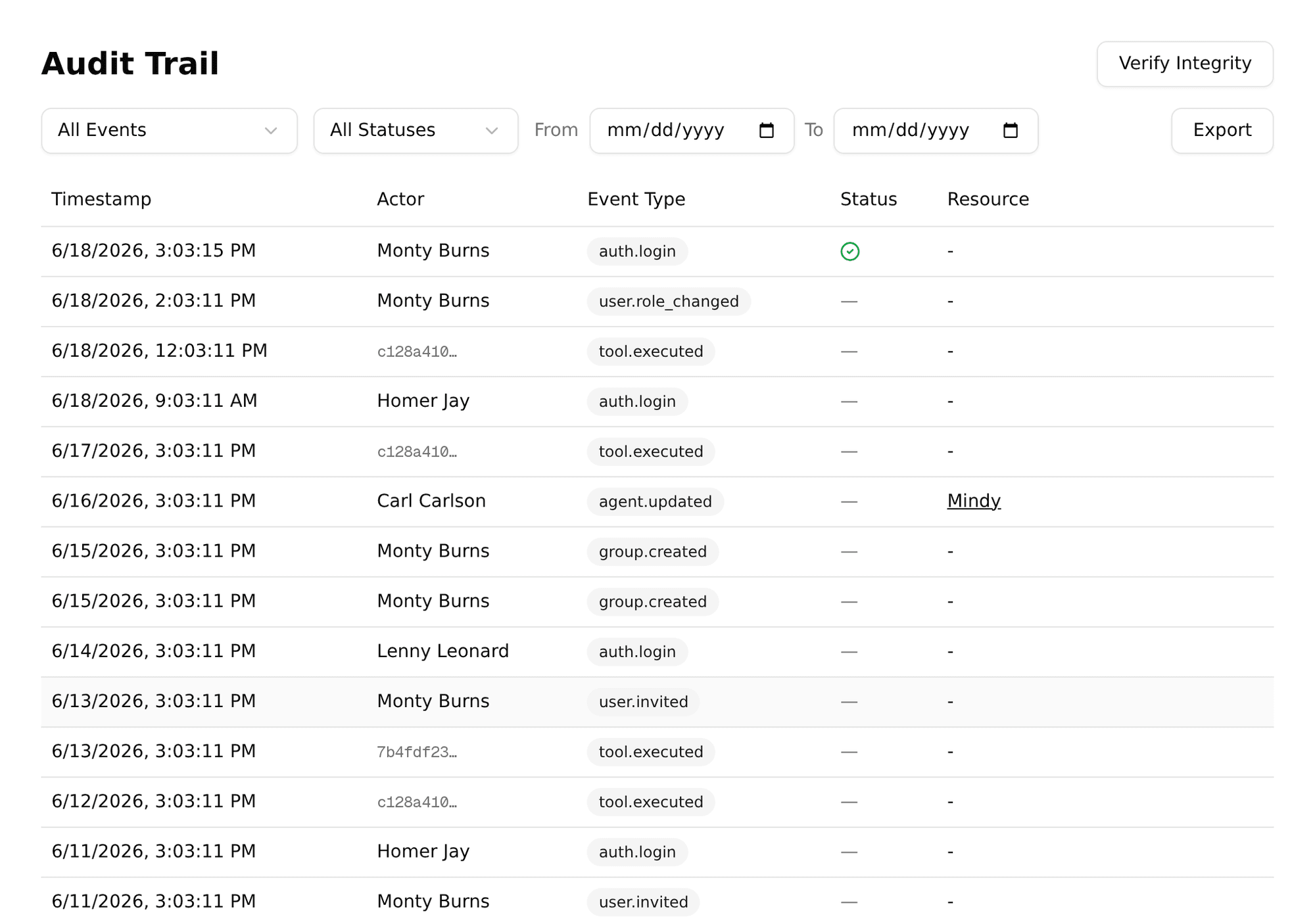
Pinchy logs events across six categories. Every entry includes a timestamp, the actor (user or system), and a cryptographic signature.
Every tool an agent uses: file reads and writes, Odoo and email operations, and web requests. The log includes the tool name, parameters, and result. If an agent tries to use a tool that's not in its allow-list, that gets logged too.
Successful logins, failed attempts, password resets. You see who accessed the platform and when. Failed login attempts are logged with the attempted email for security monitoring.
Agent created, updated, deleted. Personality changes, permission changes, tool configuration changes. The full before-and-after state is captured.
Invitations sent, accounts created, roles changed, users deactivated. Every change to who can access the platform is recorded.
Provider settings, enterprise key changes, context updates. When an admin changes platform-wide settings, the audit trail captures it.
Group created, members added or removed, agent visibility changed. The full history of who had access to what, and when it changed.
Audit logs are only useful if you can trust them. Pinchy uses three mechanisms to ensure integrity:
Every audit entry is signed with a server-side secret. The signature covers the event type, actor, timestamp, and details. Modifying any field invalidates the signature.
PostgreSQL triggers prevent UPDATE and DELETE operations on audit entries. The only allowed operation is INSERT. Even a database admin running raw SQL triggers the protection.
The built-in verifier recomputes every row's signature against the server-side secret and returns the IDs of any row whose signature no longer matches. One click, entire log checked, bad rows flagged.
Honest note: This is tamper-evident, not tamper-proof. Someone with direct database access and the signing secret could re-sign a modified row. But they can't do it silently — any external backup, SIEM export, or previously exported CSV would reveal the discrepancy. For most compliance scenarios, tamper-evidence is exactly what auditors need.
These two requirements pull in opposite directions, and most products quietly pick one. GDPR Article 30 wants a record of processing. Article 17 gives the person in that record a right to have their data erased. And a log you cannot modify is precisely the thing an erasure request breaks against.
Pinchy's answer is to keep the personal data out of the immutable part in the first place. Since v0.9.0 an audit row does not store the user's ID. It stores a random pseudonym, and the mapping from pseudonym back to the person lives in the user record, which is ordinary mutable data. The signature is computed over the pseudonym, so verification still works end to end. Destroy the mapping and the trail stays complete and verifiable while the rows stop pointing at a person — crypto-erasure, rather than punching holes in the evidence.
The same discipline applies to what lands in an entry's detail. Email addresses are stored as an HMAC plus a masked preview, never in the clear, so you can still filter by "which rows involve this address" without the log becoming a copy of your address book. Message bodies are not audited at all, subjects are truncated, and recipients are masked.
Honest note: what ships today is the mechanism, not the button. Removing a user deactivates the account and revokes its sessions; the one-click irreversible erasure that destroys the mapping is still on the roadmap. And the substitution is forward-only: rows written before v0.9.0 still carry the raw user ID, because the log cannot be rewritten retroactively. That makes those older rows a retention question, not an erasure one.
Our reliability benchmark made an ERP's save silently fail and watched 14 open-weight models react: every model with a perfect task score confidently reported vendor bills that did not exist, and across 162 completed runs, not one model read its write back to check. The model that got fooled cannot be the thing that catches the mistake.
The audit trail is the detective control for exactly this case. Every tool call is logged with its parameters and result, so a claimed action can be reconciled against a logged one: a "vendor bill created" report with no matching logged create is a one-query finding, minutes after it happens instead of at month-end reconciliation. Read the full silent-failure data.
See only tool executions, only auth events, only agent changes. The event type filter narrows the view to exactly what you're investigating.
What did a specific user trigger? What did a specific agent do? Actor-based filtering for incident investigation and user activity reviews.
Export the full audit trail as CSV, including every row's HMAC-SHA256 signature. Feed it into your SIEM, archive it, or run independent verification.
AI agents can read files, act in business systems, and access sensitive data. Without an audit trail, you're trusting that nothing went wrong. With an audit trail, you can prove it.
ISO 27001, SOC 2, DORA, GDPR Article 30: they all require records of processing and ICT activities. The audit trail provides them automatically.
Something unexpected happened? Trace the exact sequence of agent actions, tool calls, and data accessed. Minute-by-minute reconstruction.
Your team trusts AI agents more when they know every action is logged. Transparency reduces resistance to adoption.
30-minute demo. We'll show you the full audit trail, verification tool, and how it integrates with your compliance workflow.
FAQ
Every significant action — tool executions, logins, agent changes, user management — is logged with a per-row HMAC-SHA256 signature covering the event type, actor, timestamp, and details. The audit log is append-only: PostgreSQL triggers prevent UPDATE and DELETE on existing entries. Any modification to a row fails signature verification.
The audit trail is tamper-evident, not tamper-proof. No software can prevent a determined attacker with database access from modifying data. But every row is independently signed — the built-in verifier recomputes each signature and returns the IDs of any rows that fail, so tampering is immediately detectable.
Yes. The audit trail exports as CSV for external analysis, archival, or integration with your SIEM or compliance tools. The export includes every signed row so you can run independent verification.