Day 33: Show Me the Tokens
“How much is this costing us?” The question every CTO asks three weeks after deploying AI agents. Today I built the answer.
Usage & Cost Dashboard
This was Issue #35, one of the most requested features since day one. Every chat turn now records token usage: input tokens, output tokens, model used, which agent, which user. Then we estimate cost based on each model’s pricing.
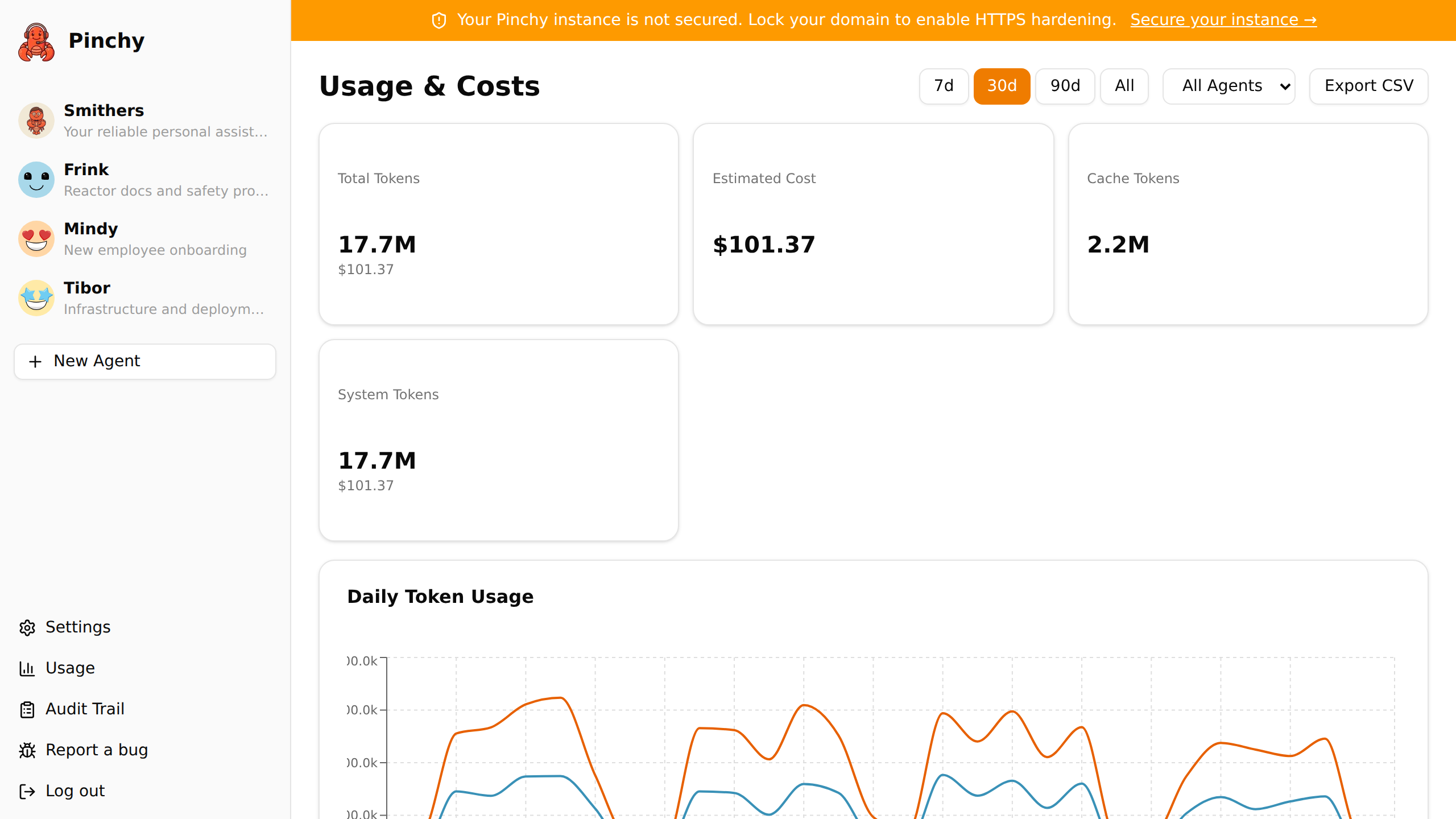
The dashboard has three views:
- Summary cards: total tokens, estimated cost, active users, and active agents for the selected period.
- Time series chart: token usage over time, filterable by agent. Built with Recharts because sometimes a line going up is the only thing that convinces a CFO.
- Breakdown table: per-agent stats with tokens, cost, and message counts. Sortable, because everyone wants to know which agent is the expensive one.
Enterprise gets extras: per-user breakdown (so you can see who’s burning through Claude Opus like it’s free) and CSV export for the finance team who will inevitably ask for a spreadsheet.
The cost estimation pulls model pricing from the OpenClaw configuration. It’s an estimate, not a billing system, but it’s close enough to answer the “how much” question without anyone logging into Anthropic’s console.
The Screenshot Pipeline Fights Back
Remember yesterday’s automated screenshot pipeline? The one that worked perfectly on the first try? Well, today it decided to stop working on CI.
The problem: fonts. Pinchy uses Geist, Vercel’s typeface. Locally, it renders beautifully. On a fresh Ubuntu CI runner? System fallback fonts. The screenshots looked like they were rendered in 2004.
What followed was a five-commit odyssey:
- macOS runner: maybe Apple’s font rendering saves us? Yes, but now
docker composedoesn’t work because macOS runners don’t have Docker. - Colima: install a Docker runtime on macOS. Works! But slow. And the fonts still weren’t right because Chromium in Playwright has its own font stack.
- Back to Ubuntu: okay, let’s just install the Geist font on the runner. Download via
gh release download. - gh CLI auth issue: the
ghcommand needs auth to download from a public repo? Fine, usecurlinstead. - Correct URL: turns out the release URL format changed. Fixed. Fonts install. Screenshots look right.
Five commits to install a font. This is CI engineering.
The WebSocket Bug Nobody Reported
Found and fixed a race condition: if you sent a message while the WebSocket was still connecting (or reconnecting after a network blip), the browser threw an InvalidStateError and the message vanished. No error message, no retry, just gone.
The fix: queue messages when the connection isn’t open, flush them automatically when it opens. Simple, obvious in hindsight, invisible to users, which is exactly how infrastructure fixes should be.
Day 33
A usage dashboard that answers the money question. A CI pipeline that required more debugging than the feature it supports. A WebSocket fix that nobody noticed was broken. And five feature pages now linked from the homepage.
The less glamorous days are the ones that make the product real.